Anka Virtualization 3.10.0
On this page
USB Passthrough for Silicon
USB passthrough for Silicon is now generally available. See Working with USB Devices for the requirements and the steps.
Devices that are not supported
macOS does not let a VM capture a USB device that has isochronous endpoints, even when the device does not use them. This includes:
- iPhones. An iPhone has an isochronous endpoint in its audio configuration.
- Most webcams, USB audio devices, and headsets.
When you select one of these devices in the Virtual Machine Accessories menu, the VM does not get the device. The VM log shows
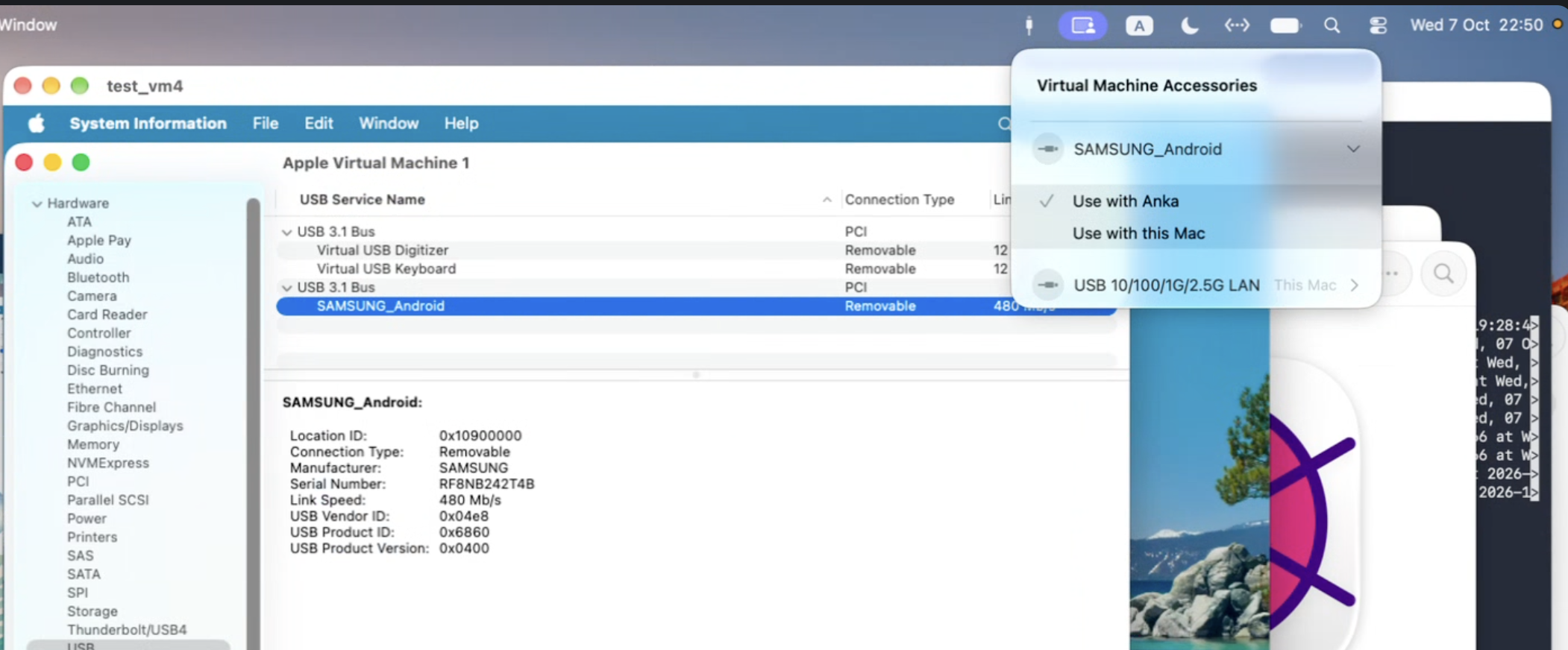
A USB passthrough device with isochronous endpoints is not supported.Android devices disconnect and connect again
Some Android devices disconnect from the VM and connect again approximately one time each second. We saw this with a Samsung phone. The VM gets the device, but the device does not stay connected long enough to use it. This is a macOS issue, and we reported it to Apple as FB25252156.
anka create reuses a macOS build without needing an IPSW
The first anka create for a macOS build still downloads the IPSW and installs it. After the install, Anka stores a tag named .base_<ProductBuild> on that VM and deletes the downloaded IPSW from the image library.
The next anka create for the same ProductBuild clones that tag. It does not download the IPSW again. The clone copies the tag onto the new VM, so later creates can still reuse the disk data after you delete the first VM.
❯ anka create vm1 latest
❯ anka create vm2 latest
vm1 installs from the IPSW. vm2 clones the stored tag.
latest and an explicit version or IPSW share a tag only when they resolve to the same ProductBuild.
FROM darwin:<version> in an Ankafile also uses this tag.
Set
ANKA_CREATE_FORCE=1to skip the stored tag and install from the IPSW again:❯ ANKA_CREATE_FORCE=1 anka create vm3 latest
Supporting OCI Layers
Anka is now compatible with OCI layers. They are related to Anka Template Tags, so we’ll call them OCI Tags for the rest of this guide.
As expected with OCI layers with other tools, an OCI tag from one VM can be pulled onto any other VM. The other VM can have a different name, a different macOS version, or live on another host. Keep the vanilla macOS disk as a full tag in the Anka Registry or in an OCI registry, and pull that tag when a host needs the foundation. Store each tool as its own OCI tag in an OCI registry, and pull those tags when the VM needs them.
Store OCI tags in an OCI registry. Use anoci://URL or anhttps://URL whose path contains/v2/. The Anka Registry does not store these types of tags. A push to the Anka Registry ignorespush_modeand--thin, and always stores the full tag.
OCI layers compression can be controlled with theANKA_COMPRESSION_LEVELenvironment variable. Setting it to1turns on gzip and sets zlib’s level to 1 (fastest / lightest compression).
OCI tags and Anka Registry tags behave differently. Here are some important differences to be aware of:
- OCI tags are stored only in an OCI registry.
- Pulling an OCI tag that is already on the VM shows
already up-to-date. It does not remove contents from the VM. Pulling a Anka Registry Tag will force the exact state of the VM when the tag was created, always, even if you made changes but haven’t pushed a new tag. OCI Tags pulled up until then will be removed. Ultimately, Anka Registry tags and OCI tags can be combined only if you first pull the Anka Registry tag. - OCI tags stack on a VM. They do not remove contents from the VM (unless you whiteout a file in the archive you pull). Pro Tip: Pull an OCI tag onto a VM that already has an Anka Registry tag on it, and you can revert to it whenever you mess up the OCI tags and want a clean slate.
Exclude files from OCI tags with ankaignore
When you push or export a VM with push_mode 2, Anka does not include the paths in the ankaignore file. The default file is /Applications/Anka.app/Contents/Resources/ankaignore. It excludes caches, logs, temporary files, and Spotlight data.
To exclude more paths, copy the default file, add your paths, and set the ankaignore config key to your copy:
❯ cp /Applications/Anka.app/Contents/Resources/ankaignore ~/ankaignore
❯ echo 'Users/*/Downloads' >> ~/ankaignore
❯ anka config ankaignore ~/ankaignore
To use a different file for one command only, set ANKA_ANKAIGNORE:
❯ ANKA_ANKAIGNORE=~/xcode.ankaignore ANKA_PUSH_MODE=2 anka push xcode-builder -t xcode-26.1 oci://registry.example.com/v2/xcode
Anka also uses a .ankaignore file in the current directory. Put one in each tool’s build folder, then run anka push from that folder:
❯ cd ~/tools/xcode
❯ cp /Applications/Anka.app/Contents/Resources/ankaignore .ankaignore
❯ echo 'Users/*/Downloads' >> .ankaignore
❯ ANKA_PUSH_MODE=2 anka push xcode-builder -t xcode-26.1 oci://registry.example.com/v2/xcode
Anka uses only one file. It uses the first file that it finds, in this order:
.ankaignorein the current directory.- The file in
ANKA_ANKAIGNORE. - The file in the
ankaignoreconfig key. If you do not change it, this is the default file.
Your file replaces the default file, so keep the default lines. The rules are like .dockerignore:
- Each path is relative to the root of the VM disk, with no leading
/. A path without a/matches that name in any folder. *matches one folder level.**matches any number of levels.- When you exclude a folder, Anka also excludes all of its contents.
- A line that starts with
!keeps a path that a line above it excludes. - A line that starts with
#is a comment.
Learn more
- Templates and Registries: choose the Anka Registry, an OCI registry, or both.
- Templates and tags: full tags, OCI tags,
push_mode, and--thin. - OCI tags: pull and push OCI tags, with examples.
- Appending archives to OCI tags: add files to a tag, or remove them with a whiteout.
- Moving to OCI tags: move the tool layers of your Anka Registry templates to OCI tags, one step at a time.
- Combining both registries: keep the macOS base in the Anka Registry and tools as OCI tags.
- Preparing a build VM: build a VM from OCI tags on a producer host or on each runner.
- Creating VMs with an Ankafile: create a VM from a file that lists the OCI tags.
- Export and import an OCI tag: move an OCI tag without a registry.
- Edit a layer before you push it: browse and change an OCI tag layer with anka-layer-editor.
System proxy and PAC support
CLI HTTP requests now use the macOS system proxy settings for the request URL. VM network traffic does not use this proxy.
These requests use the system proxy:
- Registry HTTP, including
anka pull,anka push, the OCI registry API, and the registry handshake. - An HTTP or HTTPS installer download during
anka create. - The tools feed download during
anka create. - The license key lookup from
anka license show -k.
Anka supports these proxy types:
- HTTP
- HTTPS
- SOCKS
- A Proxy Auto-Configuration (PAC) URL. Anka downloads the PAC script and uses the proxy that the script returns.
Hosts in the system proxy exception list do not use the proxy. A list entry can be *, a host name, a domain suffix, or an IPv4 or IPv6 address with a CIDR mask.