Regulated Sector
Problem
Unmanaged Macs sat on desks or in a lab. Access was informal. Image drift made it hard to say which Xcode and SDK a build used. Public cloud Macs were not approved, or were approved only with controls the team did not have.
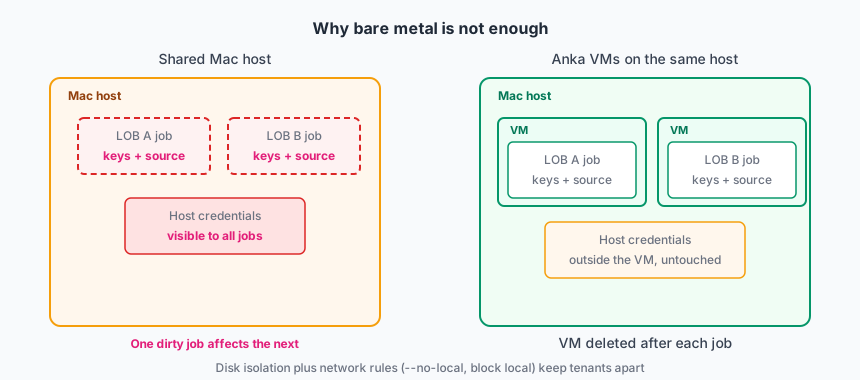
Jobs on those Macs also put the host and other workloads at risk. A VM boundary is required so one job cannot reach another VM or the node.
They needed:
- Hardware and images inside the bank network.
- CI workflows that request a macOS VM without Anka CLI or Controller URLs in every workflow file.
- A record of who started what, and from which template.
- No VM-to-VM or VM-to-host network path.
- A change process for images, not ad-hoc
brew installon a shared Mac.
Deployment model
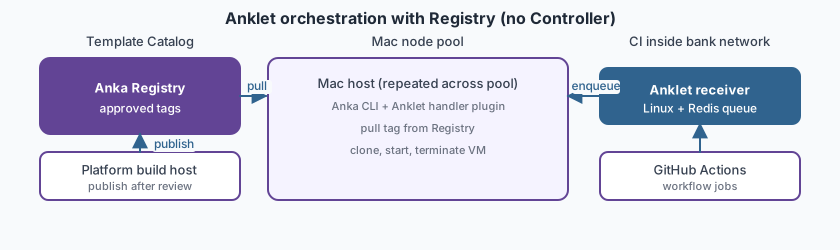
On-prem Mac nodes with the Anka Virtualization CLI on each host. An Anka Registry on the internal network stores approved templates and tags. Anklet orchestrates VMs: a GitHub Actions receiver plugin on Linux listens for workflow webhooks, a Redis queue holds pending work, and GitHub Actions handler plugins on each Mac clone, start, and terminate VMs through the CLI. When a handler needs a template or tag that is not already on the host, Anklet pulls it from the Registry. There is no Anka Build Cloud Controller. Anklet is open source. The bank forked it and added custom code to the GitHub Actions plugins for security steps their security team required.
Anklet abstracts the full VM lifecycle from line-of-business teams. In GitHub Actions they only specify the approved template and tag in the workflow YAML. Anklet handles Registry pull, VM clone and start, runner registration, the bank’s security preparation steps, and VM cleanup behind the scenes. Anklet JSON logs feed the bank’s existing audit pipeline.
Scale
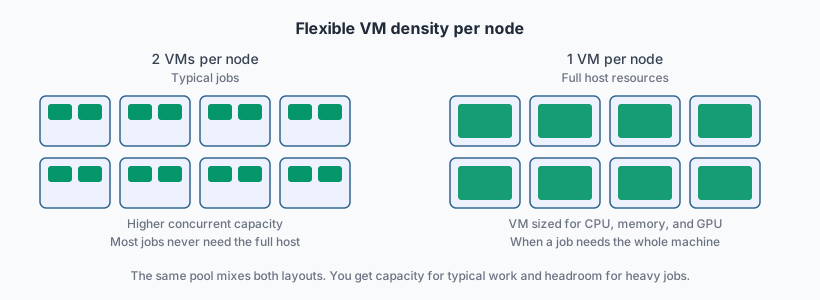
Tens of nodes. Concurrent VMs stay in the same order of magnitude. Growth is slow and planned.
Most jobs never need the full resources of the host. Anklet handlers place two smaller VMs on a node when the job fits. Heavier build or test jobs run in a VM configured to consume the full CPU and memory of the host. Template count is small and versioned through change control.
How Anka is used
Mac fleet and Anklet
Each Mac node has the Anka CLI and the bank’s fork of the Anklet GitHub Actions handler plugin. A separate Linux host runs the receiver for GitHub workflow webhooks and connects to a bank-operated Redis instance. When a workflow queues a macOS job, the receiver enqueues it; a handler on a node with capacity picks it up, pulls the template and tag from the Registry, clones, and starts the VM.
Before the handler registers the self-hosted runner, the fork runs extra preparation steps the security team required: hardening checks, approved credential injection, and logging hooks wired to internal tools. Those steps live in the handler path, not in line-of-business workflow files. The handler then registers the runner, watches the job until it finishes or times out, and deletes the VM and runner registration.
Template Catalog
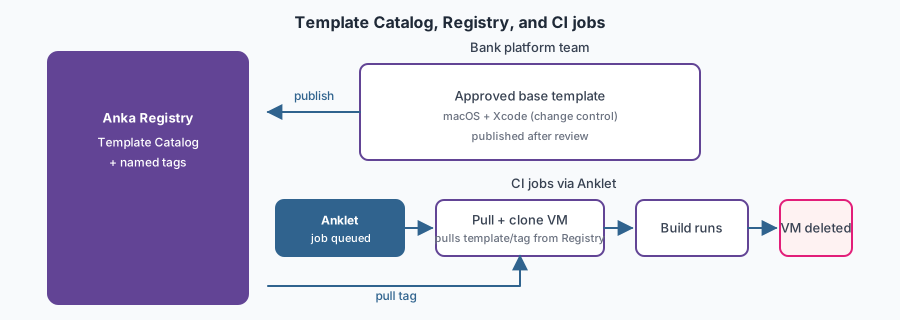
A platform team builds VM templates and tags in a locked-down pipeline (CLI or Packer). Each tag has a macOS version, Xcode, and the SDKs that line-of-business approved. Tags are published to the Registry only after change control. Together they form the Template Catalog auditors can name.
Line-of-business teams set the template and tag in the workflow YAML. They do not build images on the node. When a new tag version passes review, the platform team publishes it to the Registry and updates the tag name workflows target.
That work is image creation, not day-to-day CI. Every template change follows the same review process as other production images.
CI and jobs
- GitHub Actions queues a macOS workflow job. The Anklet receiver places it in Redis.
- An Anklet handler picks up the job, pulls the tag from the Registry, clones, starts the VM, and runs the bank’s security preparation steps.
- The job runs inside the VM. Logs and artifacts go to the bank’s existing stores.
- Anklet terminates and deletes the VM when the job ends or times out.
When someone needs a GUI session, they use the approved access path on the VM, not a shared physical Mac. Production tags use CLI advanced security: --no-local and IP filtering (block local). A started VM cannot scan the host or a neighbor VM.
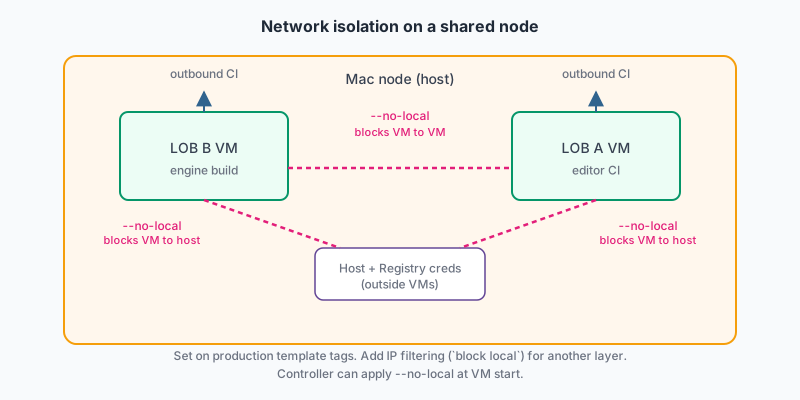
Value
macOS CI becomes a controlled service: known images, known access, known lifetime of each VM. Audit questions get an answer (which tag, which job URL, which node) from Anklet logs instead of a guess about a lab Mac. Teams spend less time fighting image drift.
The Template Catalog holds the approved macOS and Xcode combinations the bank runs. Lines of business do not need a dedicated host per combination. Any node can pull the tag from the Registry and run it. That model fits slow, planned growth without a Mac per team per OS version.
Practices that worked
- Fork open-source Anklet when security controls belong in VM preparation, not in every workflow file. Keep upstream receiver/handler behavior; add bank-specific steps after clone and before runner registration.
- Put template changes through the same review you use for other production images.
- Use Anklet so GitHub Actions workflow files never carry Controller URLs, Registry credentials, or multi-step VM cleanup stages.
- Keep the Registry, receiver, and Redis on the internal network. Mac nodes need no public internet access.
- Cache hot tags on the nodes. Cold Registry pulls during a busy week will saturate the network.
- Set
--no-localor IP filterblock localon production templates. Do not rely on the shared network default to isolate VMs from each other or the host. - Set job timeouts in Anklet so a hung build terminates the VM and frees the slot.
- Delete the VM at the end of the job. Do not reuse a running VM across unrelated builds.
Related docs
- Getting Started (CLI)
- Creating VMs
- Installing the Anka Virtualization package
- Anklet (open source; bank forked the GitHub Actions receiver and handler plugins)
- Setup Controller and Registry (standalone Registry; no Controller)
- GitHub Actions with Anka
- Advanced Security Features (CLI) (
--no-local, IP filtering) - VM networking