Gaming
Problem
Shared Macs filled up during peak hours. A failed or dirty job left the host in a bad state for the next one. Teams kept extra hosts “just in case,” which raised cost and still did not give enough parallel capacity when a release branch and a nightly both ran.
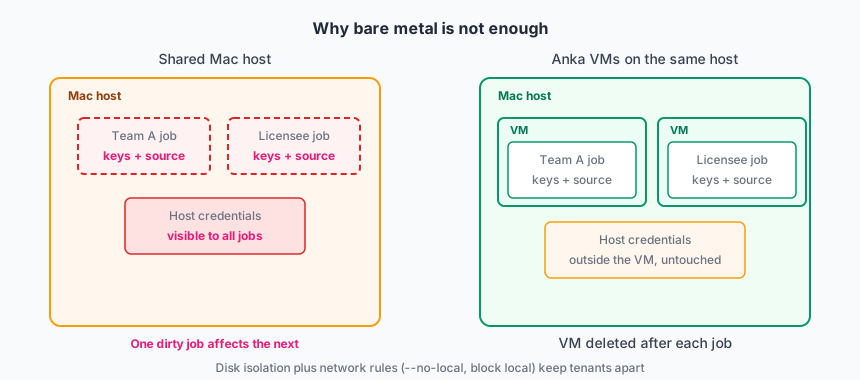
Jobs on bare metal also put the host and other people’s IP at risk. A licensee or internal team that runs on the host can see source, signing keys, and caches that belong to someone else. They can also reach host credentials and tools. A VM boundary is required so one job cannot read another job’s tree or the node itself.
They needed:
- Many jobs in parallel without one job touching another job’s disk or keychain.
- Isolation from the host and from other tenants so engine IP and licensee code stay in the VM that owns them.
- Fast start from a known-good image, not a long host reboot.
- One set of images that several CI projects could pull.
Deployment model
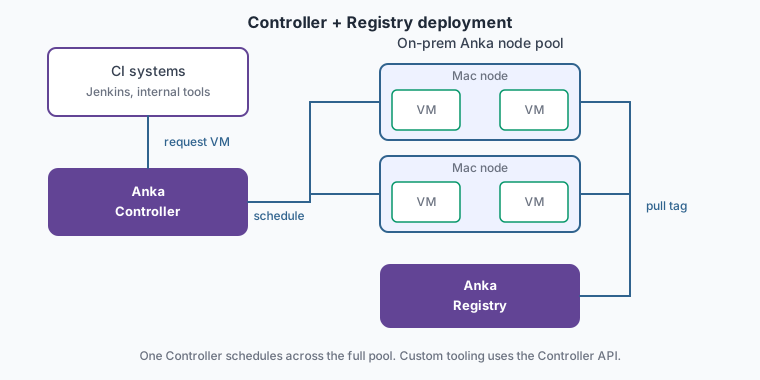
On-prem Mac nodes plus an Anka Build Cloud Controller and Registry. The CI system talks to the Controller to request VMs for the specific jobs. Nodes pull VM templates and tags from the Registry.
They use the Anka Controller instead of one of our controller-less options. Controller-less works when GitHub Actions or Buildkite is the queue. A runner on each host starts the VM with the CLI. That is a good fit when you already run one of those products. This company runs several CI systems and internal tools. They need the Controller API and plugins so they can schedule across the full node pool and build their own automation on top.
Scale
Tens to low hundreds of Anka nodes. Hundreds of concurrent VMs during a release week. A smaller idle pool on weekends.
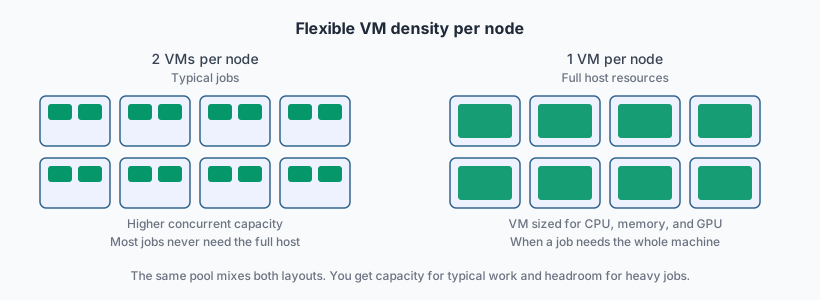
Most jobs never need the full resources of the host. The Controller places two smaller VMs on a node when the job fits, which raises concurrent capacity on the same hardware. Heavier jobs run in a single VM configured to consume the full CPU, memory, and GPU of the host. The same pool mixes both layouts, so you get flexibility for big builds and density for everything else.
How Anka is used
Build Cloud environment
Their Anka Build Cloud runs on-prem. It has a Controller and Registry and a pool of Mac nodes with the Anka Virtualization CLI installed. The nodes are joined to the Build Cloud. The Controller schedules VMs across the pool. The Registry stores the templates and tags that nodes pull when a job starts.
Template Catalog
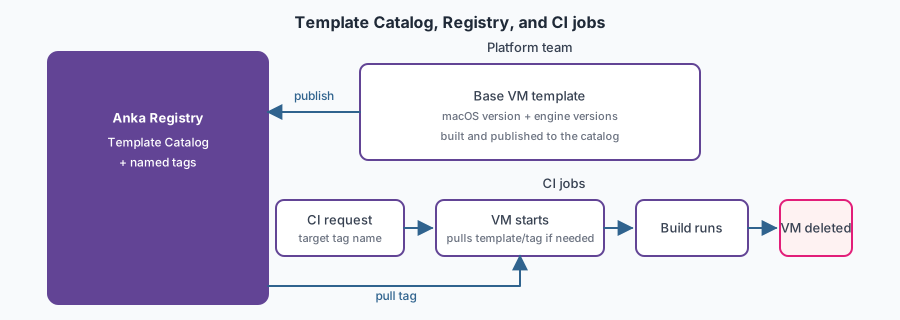
The platform team publishes base VM templates in the Registry. Each base has a specific macOS version and specific engine versions installed on it. Together these bases form the Template Catalog. Hundreds of derived templates and tags sit in the Registry on top of those bases.
Product teams and licensees extend the catalog with a YAML file in their repo or project. The file selects a base to clone, lists what to install inside the VM, and sets the template or tag name to publish. Automation builds that image and stores it in the Registry under that name. CI jobs target that name directly.
When someone changes the YAML, automation rebuilds and replaces the existing tag. A second YAML file in the same repo creates a separate named tag instead of updating the first one.
That pipeline is image creation, not CI. Packer and CLI scripts are typical tools for building the base templates and running the clone-and-install steps.
Automation notifies a team when a new or updated tag is ready in the Registry. They can start jobs against the new name or keep running against the old one until they are ready to switch.
CI and jobs
- CI requests a VM from the Controller for the configured tag.
- The node pulls the tag from the Registry and starts the VM.
- The job runs inside the VM.
- The VM is deleted when the job ends.
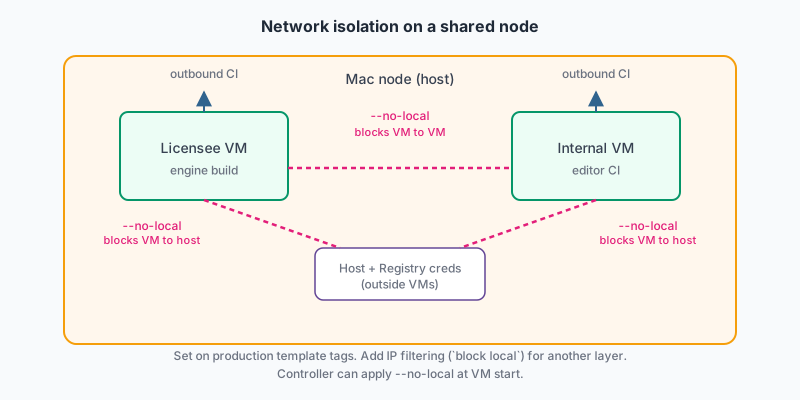
The job never runs as a user on the Mac node. Host agents, Registry credentials, and other tenants’ disks stay outside the VM. Production tags use CLI advanced security: --no-local and IP filtering (block local) so a licensee VM cannot reach another VM or the host. Registry pull time is the main warm-up cost on a cold tag. Nodes cache recently used tags so the next job of the same type starts faster.
Value
Peak parallel capacity went up without a matching increase in dedicated “overflow” Macs. The Template Catalog holds many macOS and engine combinations as templates and tags. Teams do not need a dedicated host for each combination. That model does not scale when licensees and internal teams mix OS versions and engine trains every release. Any node in the pool can pull the tag a job targets and run it.
Jobs start from a clean VM, so flake from leftover files and keychain state dropped. A job cannot read the host or another tenant’s IP the way it can on a shared bare-metal Mac. Release trains share the same images instead of each team maintaining its own host image.
Practices that worked
- Tag by the matrix you actually ship (OS, Xcode, engine train). Do not keep one “latest” image for all jobs.
- Delete the VM at the end of the job. Do not reuse a running VM across unrelated builds.
- Do not run licensee or multi-team jobs on the bare-metal host. Keep other people’s source and keys inside the VM.
- Set
--no-localor IP filterblock localon production tags so VMs cannot reach each other or the node. - Cache hot tags on the nodes. Cold pulls during a release week will saturate the Registry.
- Size the node pool for the peak you must hit, then let idle nodes sit. Do not keep a second shadow fleet of unmanaged Macs.