Gaming Studio
Problem
One game title’s nightly could fill every host. When a nightly crashed the host or left an orphaned build agent running, that node stayed offline until someone rebooted or cleaned it. Other titles queued behind the blocked capacity. Hosts that ran signing or UI tests also left certificates and simulators in a bad state for the next job. Build times moved around from day to day, which made release planning hard.
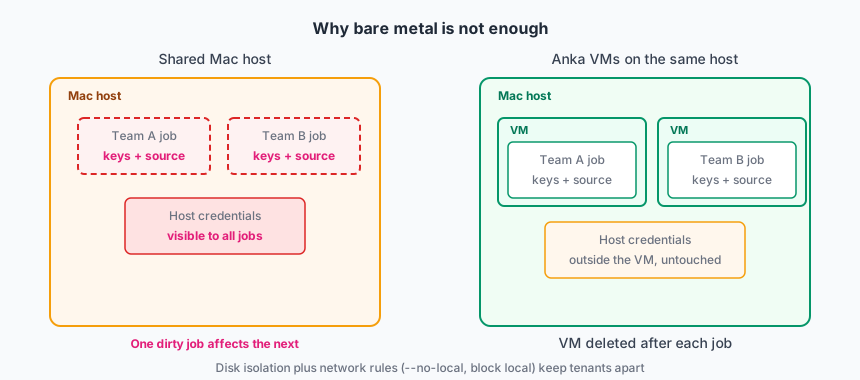
Jobs on bare metal also let one title reach another title’s source, signing material, or the host itself. A VM boundary is required so Team A cannot read Team B’s tree or the node.
They needed:
- Isolation so Team A’s job cannot see Team B’s source or signing material.
- A way to reserve capacity for a title that is in a store freeze.
- A known-good tag stack per title, not a single host image that every project mutates.
- Fast start from a known-good tag, not manual host cleanup between jobs.
- A failed or hung nightly on one title must not block other titles on the same host.
- Fast CI starts without cloning a multi-gigabyte repo on every run.
Deployment model
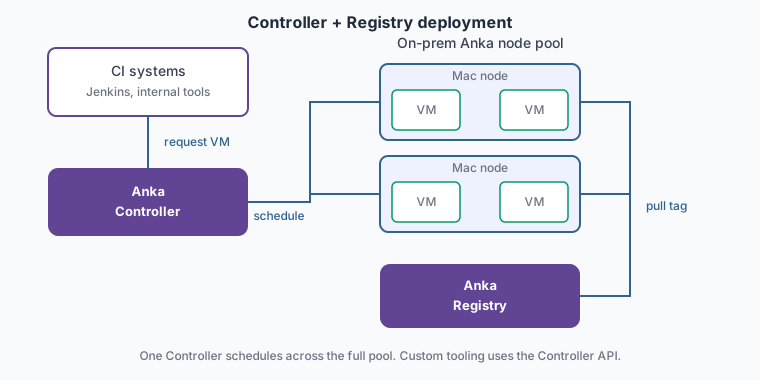
On-prem Anka nodes with Controller and Registry. CI is usually Jenkins, GitLab, or GitHub Actions through the Controller plugins.
They use the Anka Controller with authorization and groups so a team can start VMs from its templates only. Node assignment follows the same groups when a title needs a reserved slice of the fleet. Controller-less fits a single CI product on a fixed host. This studio runs several CI tools and needs one API to schedule across the full pool.
Scale
Dozens of nodes. Tens of concurrent VMs on a normal day. More during a store submission week.
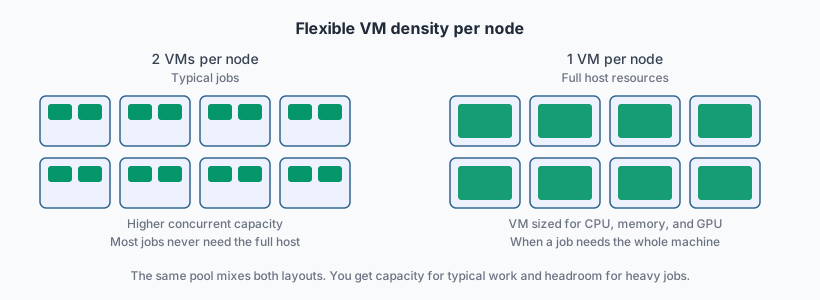
Most compile jobs never need the full resources of the host. The Controller places two smaller VMs on a node when the job fits. UI and simulator tests run in a separate tag on a VM sized for display and disk. Heavier jobs consume the full CPU, memory, and GPU of the host. Each title keeps a short stack of tags per macOS line (base, Xcode, git cache), not hundreds of one-off images.
How Anka is used
Build Cloud environment
Their Anka Build Cloud runs on-prem. It has a Controller and Registry and a pool of Mac nodes with the Anka Virtualization CLI installed. The nodes are joined to the Build Cloud. The Controller schedules VMs across the pool. The Registry stores the templates and tags that nodes pull when a job starts.
Template Catalog
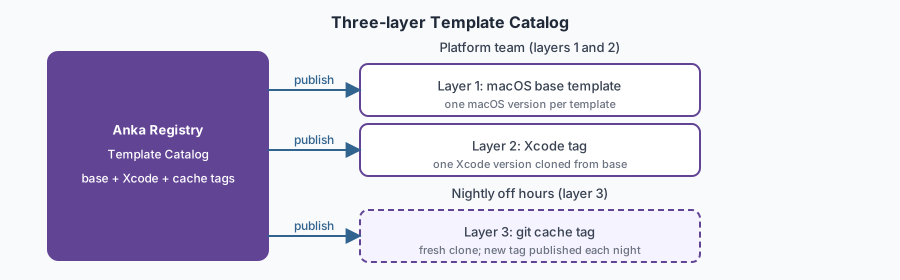
A platform or tools team builds the Template Catalog in three layers in the Registry. Each title gets its own layer-2 and layer-3 tags on shared macOS bases.
Layer 1 — macOS base. A VM template for a specific macOS version. Nothing title-specific yet.
Layer 2 — Xcode. A tag cloned from that base with one Xcode version installed. A title needs only one Xcode line per macOS base, not a large matrix.
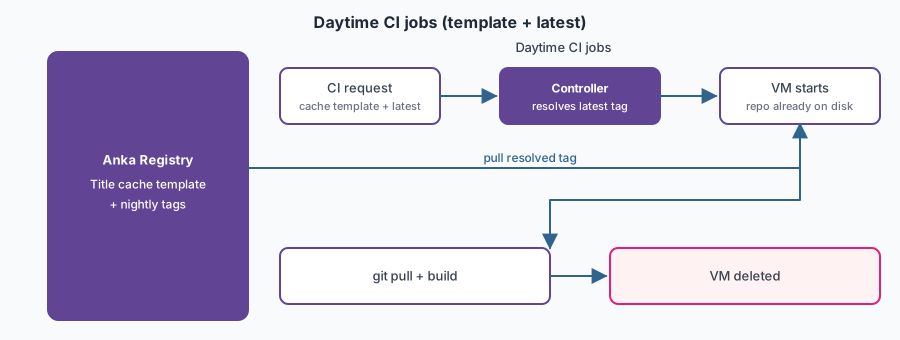
Layer 3 — Git cache tag. A tag cloned from the Xcode layer. Nightly automation runs a full git clone of the title repo into the image and publishes a new tag on the title’s cache template. Daytime CI jobs start from that template so each run begins with the repo already on disk.
During the work day, a job starts from the cache template and runs git pull for that day’s commits. That covers incremental changes without recloning the full tree on every run.
Each night in the title team’s off hours, automation publishes a fresh cache as a new tag on the template. The next morning every job starts from a clean cache. Stale build state from a bad run does not carry into the next day.
Layers 1 and 2 change when macOS or Xcode versions change. Layer 3 refreshes every night. Packer and CLI scripts are typical tools for layers 1 and 2 and for the nightly cache job.
Title teams point CI at the cache template and leave the tag set to latest. That is a Controller option, not a tag name stored in the Registry. The Controller routes latest to whichever tag was pushed most recently, so pipelines pick up each night’s new cache without a config change. When the platform team bumps macOS or Xcode, they rebuild layers 2 and 3 on the new stack. Title pipelines stay on latest.
CI and jobs
- CI requests a VM from the Controller for the title’s cache template, with tag latest.
- The Controller resolves latest to the tag the nightly job pushed most recently. The node pulls it from the Registry and starts the VM.
- The job runs
git pull, then Xcode or the game-client build inside the VM and uploads artifacts. - The VM is deleted when the job ends. If a nightly hangs, a CI job timeout terminates the VM. The node stays available for the next job.
The nightly cache refresh is a separate scheduled job. It rebuilds layer 3 and publishes to the Registry. It is not the same as a title’s compile nightly running on a long-lived VM.
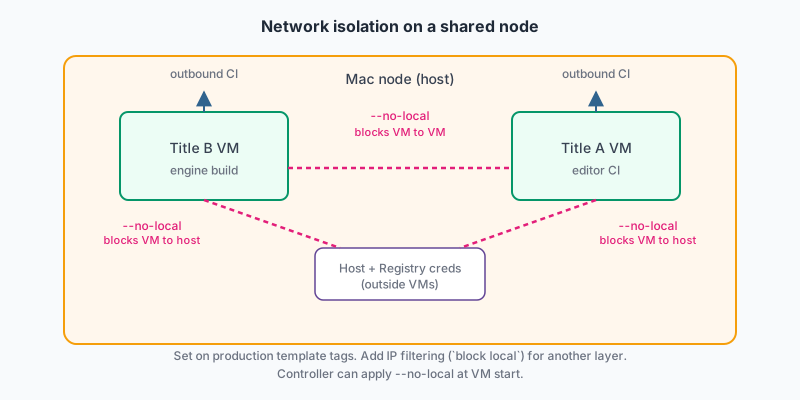
The job never runs as a user on the Mac node. When two titles share a node, production tags use CLI advanced security: --no-local and IP filtering (block local) so one title cannot reach another title’s VM or the host. Nodes cache recently used tags so the next job of the same type starts faster.
Value
Queue time became predictable enough to plan store freezes. Teams stopped “borrowing” a teammate’s Mac for a hotfix. Shared-host flake (wrong cert, leftover simulator, dirty DerivedData) dropped because each job gets a new VM. A bad nightly no longer orphans a build on the host and blocks other titles. If a job hangs, a CI timeout terminates the VM and frees the slot.
The Template Catalog holds a macOS base, one Xcode tag per title, and a nightly-refreshed git cache tag on top. Teams do not clone a giant repo on every CI run, and they do not need a dedicated host per title. Any node in the pool can pull the cache tag a job targets and run it.
Practices that worked
- Delete the VM when the job ends. Set a CI job timeout so a hung nightly terminates the VM instead of holding the host for other titles.
- Build three layers: macOS base, one Xcode tag, then a git cache tag. Do not bake Xcode into the base if you refresh macOS and Xcode on different schedules.
- Point daytime CI at the cache template with tag latest. Run
git pullinside the job for same-day commits. Let the nightly job publish a new tag; do not ask title teams to retarget tag names when the cache refreshes. - Rebuild the cache tag from scratch in off hours, not from a VM that ran customer builds all day.
- Give each title its own layer-2 and layer-3 tags. Do not let every project write into one shared running VM.
- Reserve a node group for a freeze week. Leave the rest of the fleet for other titles.
- Keep signing material in the title template or inject it at job start. Do not leave it on the host.
- Set
--no-localor IP filterblock localwhen titles share a node. Disk isolation is not enough if VMs can still talk on the network. - Split compile jobs and UI-test jobs onto different VM sizes so you do not waste a whole node on
xcodebuild. - Tag by the matrix you actually ship (OS, Xcode). One Xcode tag per macOS base is enough unless you truly run multiple trains in parallel.