Enterprise using AWS EC2 Macs
Problem
Each brand within the company bought a few Mac minis and ran builds on the host. Images diverged. Simulator state leaked between jobs. One region had no spare host for a store submission. Another region had idle hardware. Central IT could not say how many Macs existed or which Xcode build a release used.
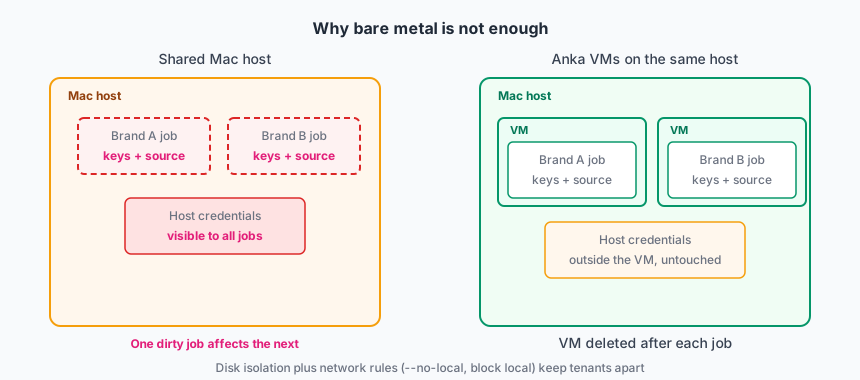
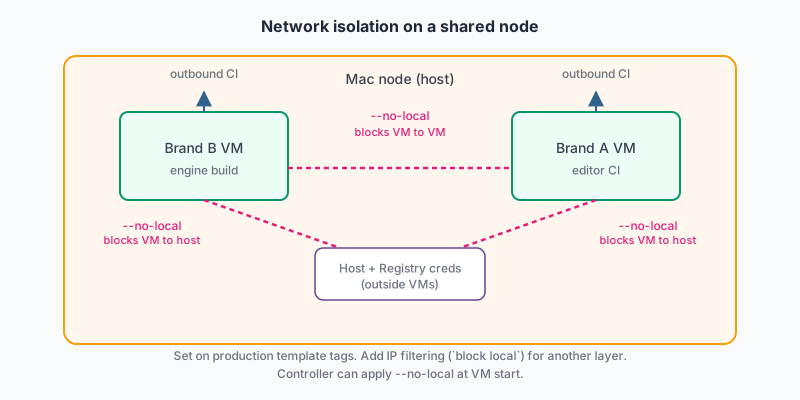
Jobs on those hosts also let one brand reach another brand’s source or the node itself. A VM boundary is required when brands share hardware.
They needed:
- One image pipeline that brands can still customize.
- A Mac fleet that can grow for a store freeze without buying hardware per region.
- No annual Anka license renewal or fulfillment tracking on each node.
- iOS simulator tests inside the CI VM, not on the bare-metal host.
- Support for more than one CI product without a second virtualization stack.
- Isolation so one brand’s VM cannot reach another brand’s VM or the Mac node.
Deployment model
All Mac CI runs on AWS EC2 Mac instances started from the Marketplace AMI. The AMI ships with a licensed Anka Virtualization CLI and the macOS tweaks we use for EC2 Mac. Ops does not install Anka or activate a BYOL license on each host.
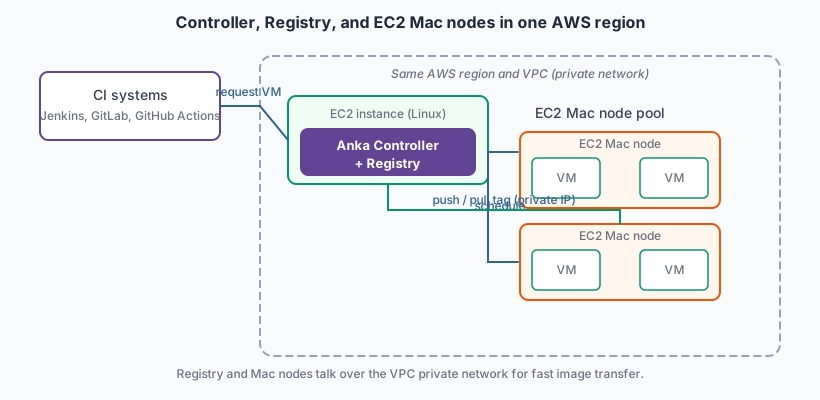
The Controller and Registry run on a Linux EC2 instance in the same AWS region and VPC as the Mac nodes. Nodes and Registry reach each other over private IP addresses inside the VPC. Template pushes and tag pulls stay on that network instead of crossing the public internet, which keeps image transfer fast when brands publish or jobs pull large Xcode and simulator layers.
Jenkins, GitLab Runner, and GitHub Actions talk to the Controller through the plugins. Brands do not each install a different Mac virtualization product.
The Marketplace AMI bills Anka hourly through AWS while the instance runs. There is no separate annual license to renew or fulfillment ID to track on each node. EC2 Mac nodes join Build Cloud per the node prep guide. Ops adds instances before a store freeze, scales the pool down on weekends when CI is quiet, and stops instances after a freeze. The Controller, Registry, and template tags stay the same as the pool scales.
Scale
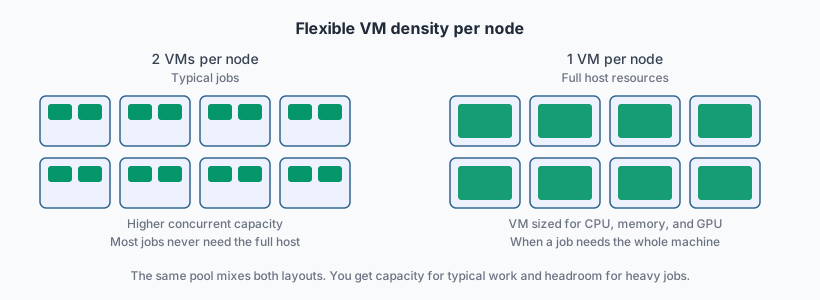
Tens of EC2 Mac instances in AWS. Concurrent VMs stay in the tens on a normal week and rise when a brand freezes. Ops stops most instances on Friday evening and starts them again Monday morning when weekday CI picks up.
Most compile jobs never need the full resources of the host. The Controller places two smaller VMs on a node when the job fits. iOS simulator test jobs run in a VM configured to consume the full CPU, memory, and display resources of the host. Store-freeze weeks add EC2 Mac instances to the same Controller. Brands keep a child tag per app, not a private Mac per region.
How Anka is used
Build Cloud environment
Their Anka Build Cloud runs entirely in one AWS region. A Linux EC2 instance hosts the Controller and Registry. EC2 Mac instances from the Marketplace AMI join the same VPC. Each Mac node already has the Anka Virtualization CLI licensed and the EC2 Mac disk and networking settings we ship in the AMI. The Controller schedules VMs across the pool. The Registry stores templates and tags; nodes pull them over the VPC private network.
Template Catalog
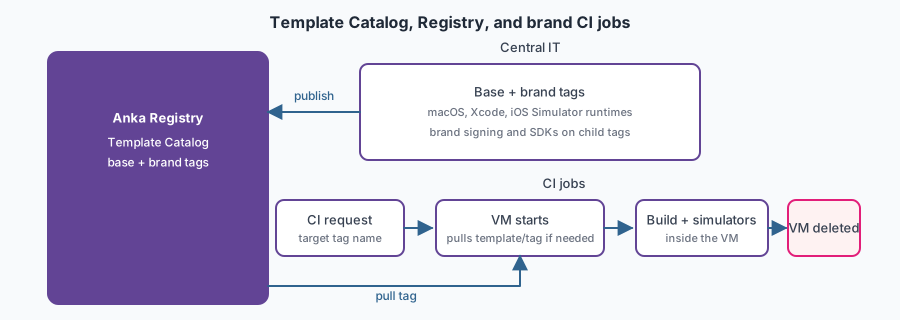
Central IT publishes a base VM template and tag in the Registry: macOS, Xcode, and the iOS Simulator runtimes every brand must stay aligned on. Each brand adds its app signing, SDKs, and test fixtures as a child tag on top of the base. Together these form the Template Catalog.
Brand teams set the tag name in their CI configuration. Packer or CLI scripts keep the base tag current so every job uses the same Xcode and simulator versions.
That work is image creation, not day-to-day CI. Brands layer on the base. They do not fork a separate image pipeline per region.
CI and jobs
- CI requests a VM from the Controller for the brand’s configured tag.
- The node pulls the tag from the Registry over a private IP and starts the VM.
- The job runs inside the VM. Compile steps and iOS Simulator tests use the Xcode and simulator runtimes baked into the tag.
- The VM is deleted when the job ends.
Before a store freeze, ops starts extra EC2 Mac instances and lets them pull the needed tags. After the freeze, ops drains and stops instances that are no longer needed. The base tag uses CLI advanced security: --no-local and IP filtering (block local) so a brand job cannot talk to another VM or the host when several brands share a node.
Value
Mac CI is one EC2 Mac fleet instead of a pile of brand-owned minis. The Marketplace AMI removes annual license renewal and per-node activation work. Hourly billing matches usage: the pool scales up for store freezes and scales down on weekends when no one is building. Co-locating the Registry with Mac nodes in the same VPC keeps template push and pull fast over private network paths. Brands still own their app-specific tag, but they do not own a second hypervisor or a private image pipeline.
Simulator tests run inside a fresh VM with a known Xcode and runtime stack. Leftover simulator data does not carry to the next brand’s job the way it did on shared bare-metal Macs. Any node in the pool can pull the tag a job targets and run it.
Practices that worked
- Publish one base tag from the center with Xcode and iOS Simulator runtimes. Let brands layer child tags, not fork the whole image.
- Run simulator tests inside the VM. Do not install simulators on the Mac node for CI jobs.
- Size simulator jobs for a full-host VM. Do not pack two simulator-heavy jobs on one node.
- Run the Controller and Registry on a Linux EC2 instance in the same region and VPC as the Mac nodes. Point nodes at the Registry private IP.
- Launch nodes from the Marketplace AMI. Do not BYOL unless you have a reason to manage licenses yourself.
- Scale the EC2 Mac pool through the same Controller. Do not stand up a second cluster for freeze week.
- Stop EC2 Mac instances on weekends and after a freeze. Running instances still cost money.
- Standardize on Controller plugins even when CI products differ. The VM lifecycle stays the same.
- Put
--no-localor IP filterblock localon the shared base tag so brands on the same host cannot reach each other or the node. - Delete the VM at the end of the job. Do not reuse a running VM across unrelated builds.