OCI tags
Anka is now compatible with OCI layers. They are related to Anka Template Tags, so we’ll call them OCI Tags for the rest of this guide.
As expected with OCI layers with other tools, an OCI tag from one VM can be pulled onto any other VM. The other VM can have a different name, a different macOS version, or live on another host. Keep the vanilla macOS disk as a full tag in the Anka Registry or in an OCI registry, and pull that tag when a host needs the foundation. Store each tool as its own OCI tag in an OCI registry, and pull those tags when the VM needs them.
Store OCI tags in an OCI registry. Use anoci://URL or anhttps://URL whose path contains/v2/. The Anka Registry does not store these types of tags. A push to the Anka Registry ignorespush_modeand--thin, and always stores the full tag.
OCI layers compression can be controlled with theANKA_COMPRESSION_LEVELenvironment variable. Setting it to1turns on gzip and sets zlib’s level to 1 (fastest / lightest compression).
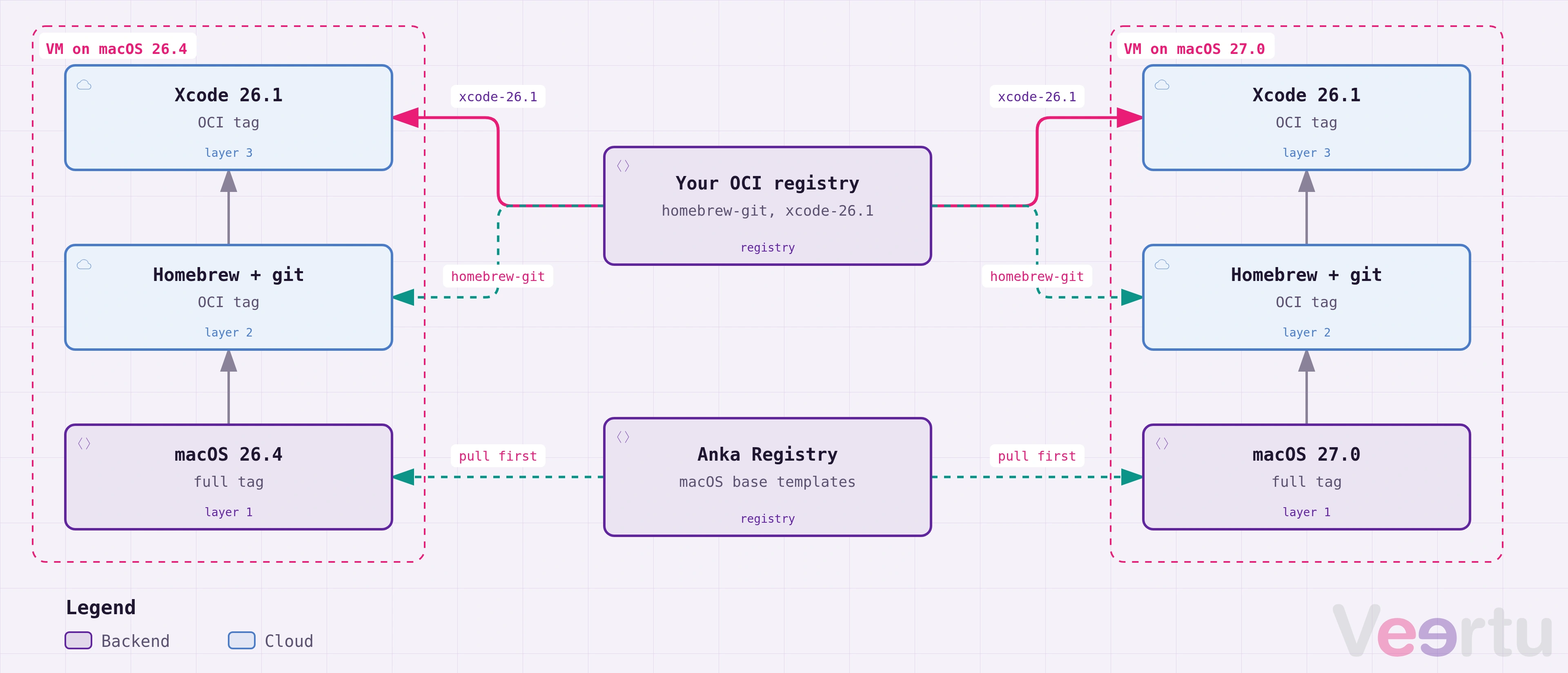
Before you mix OCI tags with Anka Registry tags, read Anka Registry tags and OCI tags.
Pull OCI tags
Pull more than one OCI tag onto the same VM.
Later pulls can come from other OCI registries.
Let’s use Homebrew as an example. Homebrew publishes bottles as OCI archives. This means we can pull cmake onto an Anka VM without installing Homebrew, adding a symlink, or changing PATH.
By default, a bottle stores its files under a version directory such as cmake/4.3.4. Anka’s --transform option rewrites that prefix to usr/local, so cmake is exactly where you want it for the default PATH to see it.
❯ anka pull 27.0.1 oci://ghcr.io/homebrew/core/cmake:4.3.4 --transform 's|cmake/4.3.4|usr/local' --dry-run
usr/local/
usr/local/.brew/
usr/local/.brew/cmake.rb
usr/local/LICENSE.rst
usr/local/README.rst
usr/local/bin/
usr/local/bin/ccmake
usr/local/bin/cmake
usr/local/bin/cpack
usr/local/bin/ctest
. . .
anka pull 27.0.1 oci://ghcr.io/homebrew/core/cmake:4.3.4 --transform 's|cmake/4.3.4|usr/local'
100% [||||||||||||||||||||||||||||||||||||||||||||||||||||||||||||]
9eec878a-7f16-492f-97e9-88e7247e43a5: pulled 19.20MiB for tag cmake--4.3.4
You’ll see the files in the VM’s /usr/local directory.
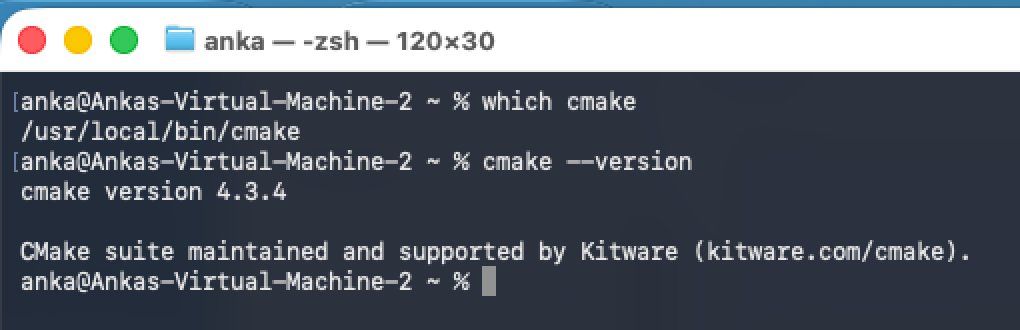
You’ll also see the tag locally under anka list and anka show commands.
❯ anka show 27.0.1 tag
+--------------+--------------------+----------------------+---------+----------+
| tag          | name               | creation_date        | state   | size     |
+--------------+--------------------+----------------------+---------+----------+
| vanilla      | 27.0.1             | Oct 12 11:48:18 2026 | stopped | 29.45GiB |
+--------------+--------------------+----------------------+---------+----------+
| cmake--4.3.4 | 27.0.1             | Oct 2 15:19:08 2026  | stopped | 256MiB   |
+--------------+--------------------+----------------------+---------+----------+
If I wanted, I could put a default in /usr/local, then install a different version of cmake into /usr/local, but with the versions folder.
❯ anka pull 27.0.1 oci://ghcr.io/homebrew/core/cmake:4.4.4 --transform 's|cmake|usr/local/cmake' --dry-run
usr/local/cmake/4.4.4
usr/local/cmake/4.4.4/.brew/
usr/local/cmake/4.4.4/.brew/cmake.rb
usr/local/cmake/4.4.4/LICENSE.rst
usr/local/cmake/4.4.4/README.rst
usr/local/cmake/4.4.4/bin/
usr/local/cmake/4.4.4/bin/ccmake
usr/local/cmake/4.4.4/bin/cmake
usr/local/cmake/4.4.4/bin/cpack
usr/local/cmake/4.4.4/bin/ctest
❯ anka pull 27.0.1 oci://ghcr.io/homebrew/core/cmake:4.4.4 --transform 's|cmake|usr/local/cmake'
100% [||||||||||||||||||||||||||||||||||||||||||||||||||||||||||||]
9eec878a-7f16-492f-97e9-88e7247e43a5: pulled 19.24MiB for tag cmake--4.4.4
❯ anka show 27.0.1 tag
+--------------+--------------------+----------------------+---------+--------+
| tag          | name               | creation_date        | state   | size   |
+--------------+--------------------+----------------------+---------+--------+
| cmake--4.3.4 | 27.0.1             | Jun 19 00:32:17 2026 | stopped | 256MiB |
+--------------+--------------------+----------------------+---------+--------+
| cmake--4.4.4 | 27.0.1             | Oct 2 15:19:08 2026  | stopped | 231MiB |
+--------------+--------------------+----------------------+---------+--------+
Deletion of a tag from the VM (like anka delete 27.0.1 --tag cmake--4.4.4) does NOT remove the data from the VM. To revert to the state prior to the OCI tag pull, you need to have an Anka Registry tag to revert to with a pull.Pull without a VM name
A pull that is only a URL creates the VM for you. Point default_vmid at a VM you already have. A UUID is the stable choice. Add :<tag> to start from that tag.
❯ anka config default_vmid <vm-uuid>
❯ anka pull oci://ghcr.io/homebrew/core/cmake:4.3.4 --transform 's|cmake/4.3.4|usr/local'
Anka creates a VM named cmake from that VM and pulls the bottle into usr/local. You do not need to install Homebrew, add a symlink, or change PATH. A job that only has the registry URL can use this form.
Push OCI tags
Machines that push to an OCI registry need the right push_mode. push_mode 1 pushes the full tag, including its base tag. push_mode 2 pushes only the changes since the base tag. A push to the Anka Registry does not use push_mode. The Anka Registry always stores the full tag.
The example below uses push_mode 1 for the macOS tag and push_mode 2 for the tool tags. For details on each mode, see Push modes.
Push the macOS base tag
Create a new VM. anka create installs macOS only. Leave push_mode at 1 for this push. 1 is the default. This push uploads the macOS disk as a full tag to the OCI registry.
❯ anka create 27.0.1 27.0.1
❯ anka push 27.0.1 -t vanilla oci://registry.example.com/v2/
An OCI registry URL has a /v2/ path. Leave the repository name off the URL. Anka uses the VM name. This push creates repository 27.0.1 and tag vanilla. A new 27.0.1 VM reports about 29.82GiB uploaded to tag vanilla. Pull this tag when a host needs the macOS disk:
❯ anka pull 27.0.1 oci://registry.example.com/v2/27.0.1:vanilla
To keep the macOS base tag in the Anka Registry instead, see Combining both registries.
Push the tool tags
Set push_mode to 2 before you push the tool tags.
❯ anka config push_mode 2
ANKA_PUSH_MODEsets the mode for one command. Use it when a change toanka configis a problem. Example:ANKA_PUSH_MODE=2 anka push 27.0.1 -t xcode-27.1 oci://registry.example.com/v2/
Install one tool, stop the VM, and push the next tag to the OCI registry. Leave the repository name off the URL. Anka uses the VM name.
❯ anka start 27.0.1
# install Xcode in the VM, then stop it
❯ anka stop 27.0.1
❯ anka push 27.0.1 -t xcode-27.1 oci://registry.example.com/v2/
The xcode-27.1 push uploads only the file changes since vanilla.
Install CMake and stop the VM.
❯ anka start 27.0.1
# install CMake in the VM, then stop it
❯ anka stop 27.0.1
The tag chain on this VM is now the vanilla tag, then the xcode-27.1 tag, then the CMake changes. You can push cmake without --thin or with --thin. Note that --thin works with push_mode 1 and with push_mode 2.
Without --thin
Without --thin, the push writes every diff after the base disk into the cmake tag (which is the current behavior customers are used to). The first layer is the vanilla tag’s own diff. On this VM that diff has no file changes, so the layer is a 1024-byte tar with no files. The next layer is the Xcode diff. The last layer is the CMake diff. The pull reads only the cmake tag. It does not fetch the xcode-27.1 tag. The Xcode files are in the cmake tag.
Pull cmake onto a second VM that is a clone of vanilla. Anka copies the Xcode files and the CMake files onto that VM. A second pull of the same tag prints already up-to-date.
❯ anka push 27.0.1 -t cmake oci://registry.example.com/v2/
❯ anka pull 15.6.1 oci://registry.example.com/v2/27.0.1:cmake
With --thin
anka pull --thin applies only the last layer in that tag. On this cmake tag, that layer is the CMake diff. The Xcode diff in the same tag is skipped. On a clone of vanilla, this pull copies the CMake files and leaves the Xcode files out.
❯ anka pull 15.6.1 --thin oci://registry.example.com/v2/27.0.1:cmake
With --thin on the push, the cmake tag stores only the CMake diff. The Xcode diff stays in the xcode-27.1 tag. A pull of cmake applies the CMake layer alone. Pull xcode-27.1 first when the VM also needs Xcode. Pull the vanilla tag first when the host does not have that tag, as shown in the first step.
❯ anka push 27.0.1 -t cmake --thin oci://registry.example.com/v2/
❯ anka pull 15.6.1 oci://registry.example.com/v2/27.0.1:xcode-27.1
❯ anka pull 15.6.1 oci://registry.example.com/v2/27.0.1:cmake
Anka stores each pulled OCI tag locally as 27.0.1--xcode-27.1 and 27.0.1--cmake.
A later push of that VM with push_mode 2, after one --thin pull, stores two file layers. One layer is the changes already on the VM. The other layer is the thin tag. The base tag, such as vanilla, stays out.
❯ anka push 15.6.1 -t cmake-on-15 oci://registry.example.com/v2/
❯ anka -j registry show oci://registry.example.com/v2/15.6.1:cmake-on-15 --manifest
Push onto an existing template
To publish those tools onto a template that is already in the registry, put that template name in the URL. This is the same as --remote-vm / -v. Use -f when the local tag already exists.
❯ anka push builder -f -t xcode-brew https://registry.example.com/v2/shared
With
push_mode2, ifsharedis a different VM thanbuilderand it already has tags, this adds the new software ontoshared’s newest tag. To add onto one tag by name:❯ anka push builder -t xcode-brew https://registry.example.com/v2/shared:toolsA
push_mode2push createstoolswhen that tag is absent. The registry tag name istools. The local tag name staysxcode-brew.
Move OCI tags without a registry
To move an OCI tag between hosts with anka export and anka import, see Export and import an OCI tag.
Edit a layer before you push it
anka-layer-editor is a separate terminal tool. It lets you browse an OCI tag layer and change it before you push it. You can remove files, add files from the host, and add whiteouts that delete a path from the base. You build the tool from that repository.
You can use it in two ways:
- On an exported archive. Export the layer with
anka export --layer, open the.tar.gzin the editor, then import the edited archive. - On a stopped VM. Run
anka-layer-editor --vm <name>. The editor opens the top layer of the VM’s current OCI tag. When you save, it commits the edits as a new local OCI tag.
Build a VM from OCI tags
- Creating VMs with an Ankafile: list the macOS version and the OCI tags in one file, and create the VM with one
anka createcommand. - Preparing a build VM: build the VM once on a producer host, or on each runner with an Ankafile.