After you create and prepare a VM, you push it to a registry as a template. Other hosts then pull that template. Anka supports two types of registry. You can use one of them, or both together.
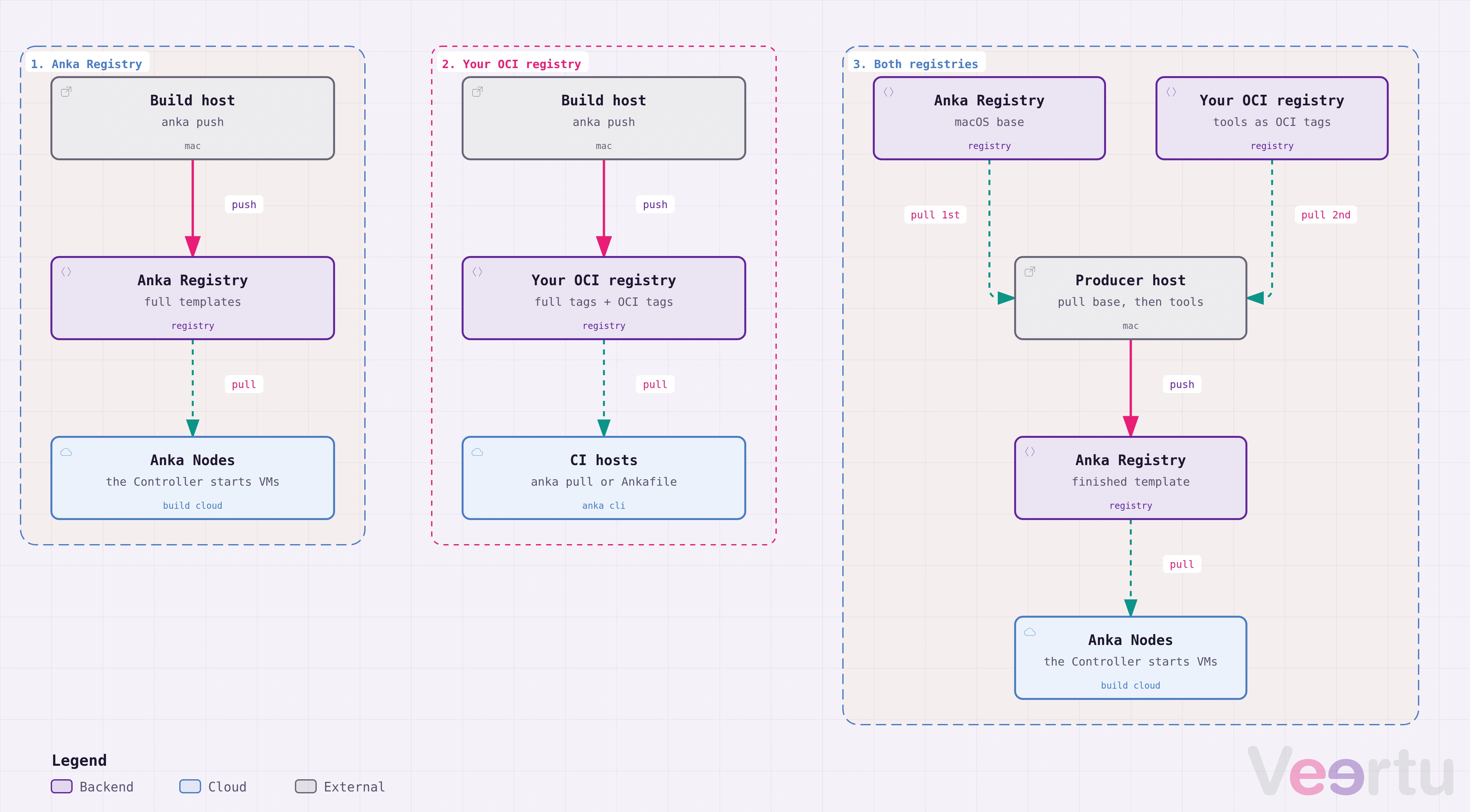
Choose a path
Use the Anka Registry
The Anka Registry is part of Anka Build Cloud. It stores full VM templates. When you pull a tag, the VM goes back to the exact state of that tag.
Use the Anka Registry when:
- You use the Anka Build Cloud Controller to start VMs. The Controller pulls templates only from the Anka Registry.
- You manage templates in the Controller UI or with the Registry REST API.
Go to Using the Anka Registry.
Use your OCI registry
You can use a registry that you already have, such as Docker Hub, Google Artifact Registry, Amazon ECR, JFrog Artifactory, or Zot. You use it from the Anka CLI only.
An OCI registry stores two types of tags:
- Full templates (Anka 3.9.0 and later). These are the same as the templates in the Anka Registry.
- OCI tags (Anka 3.10.0 and later). An OCI tag holds only the files that you add to a VM, such as the files for one tool like Xcode. You can pull an OCI tag onto any VM. OCI tags stack on the VM in the order that you pull them.
Homebrew packages are also OCI tags. You can pull a Homebrew package, such as cmake, onto a VM without Homebrew installed in the VM.Use an OCI registry when:
- You do not use Anka Build Cloud.
- Your company already has a container registry with its own access control.
- You want to add each tool to a VM as a separate layer, or pull public OCI artifacts such as Homebrew bottles.
Go to Using an OCI registry.
Use both registries
Keep the macOS base template in the Anka Registry, and keep each tool as an OCI tag in an OCI registry. A producer host pulls the OCI tags onto the base template and pushes the finished VM to the Anka Registry. The Build Cloud Controller can then start VMs from that template.
Go to Combining both registries.
Already use the Anka Registry?
You can move to OCI tags one step at a time, and keep your current templates. Go to Moving to OCI tags.
Compare the registries
| Feature | Anka Registry | OCI registry |
|---|---|---|
| Anka Build Cloud Controller | Yes | No |
| Controller UI and Registry REST API | Yes | No |
| Full templates | Yes | Yes, Anka 3.9.0 and later |
| OCI tags (file layers) | No | Yes, Anka 3.10.0 and later |
push_mode and --thin | Not used | Used |
| Public OCI artifacts, such as Homebrew bottles | No | Yes |
| Server | You run the Anka Registry on Linux, Docker, or macOS | Your existing registry, or a hosted service |
Before you choose, read Templates and tags. It explains how full tags and OCI tags behave on a VM.
Templates and tags
Templates, full tags, OCI tags, base tags, and push modes
Using the Anka Registry
Push and pull full VM templates with the Anka Registry from Anka Build Cloud
Using an OCI registry
Push and pull Anka VM templates and OCI tags with an OCI Distribution–compliant registry
Combining both registries
Keep the macOS base template in the Anka Registry and each tool as an OCI tag in an OCI registry
Preparing a build VM
Build a VM from OCI tags on one producer host, or on each runner with an Ankafile
Moving to OCI tags
Move the tool layers of your Anka Registry templates to OCI tags, one step at a time