Anka Build Plugins and Integrations for CI/CD software and Automation
Here we will break down the two different ways to use Anka with your CI/CD/Automation platforms and tools.
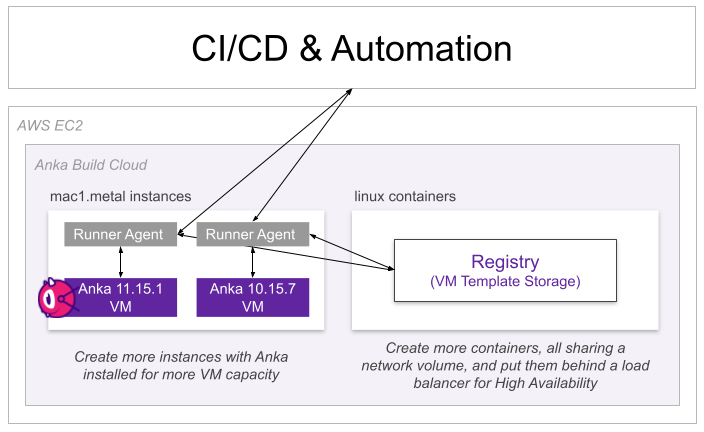
Controller-less (Registry Only)
This setup requires:
- At least one Anka Node (macOS host running the Anka Virtualization software).
- The Anka Build Cloud Registry (Linux container, macOS binaries, or Helm), or an OCI registry that you already use. Without a Controller, the
ankaCLI on each node pulls the templates and thin tags itself. - Your CI/CD’s runner/agent installed and able to execute
ankaCLI commands to prepare and use the Anka VM. For example, install the github actions runner and then use our action.
Controller + Registry
This setup requires:
- At least one Anka Node (macOS host running the Anka Virtualization software).
- The Anka Build Cloud Controller & Registry (Linux container, macOS binaries, or Helm). The Controller pulls templates only from the Anka Registry. To use thin tags with the Controller, build the template from them and push it to the Anka Registry as a full tag. See Combining both registries.
- Our plugin installed in your CI/CD tool (like the Anka Jenkins Plugin). See a full list of plugins available on our CI Plugins and Integrations page.
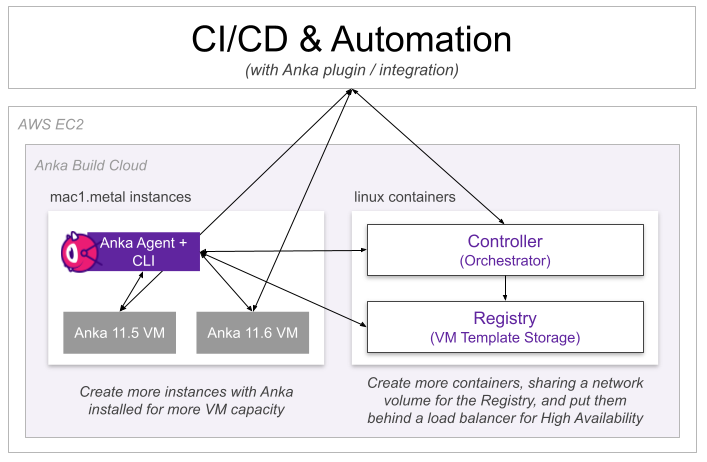
Controller + Registry
Anka Build Controller + Registry Plugins and Integrations for CI/CD software
Controller-less
Controller-less Anka Build Plugins and Integrations for CI/CD software
Packer Plugin
This is documentation for a Packer Plugin that allows you to build images that work with Anka macOS Virtualization tool.