What is Anka?
Veertu’s Anka and Build Cloud is a suite of software tools built for small or enterprise level macOS virtualization needs. It enables the creation, storage, and management of macOS virtual machines (VMs), offering a user experience similar to what Docker and Docker Hub provide for container management, but with an added orchestrator component. Anka is specifically designed for DevOps, CI/CD, and Automation teams that need to build and test macOS or iOS applications.
Anka is a mature and battle-tested solution for small or large-scale macOS virtualization. Leveraging a combination of custom and Apple hypervisor/virtualization technology, Anka offers enhanced performance and security. It provides a simple CLI for generating Anka macOS VMs as well as tools like Packer. You can then manage the VMs as Templates/Tags in the Anka Registry (part of the Anka Build Cloud) and push/pull to and from hosts in your macOS cluster.
Alongside of the Anka Virtualization CLI is the Anka Build Cloud which serves as a unified management interface for Anka Build Nodes, VM Templates/Tags, VM instances, and logs. It features intelligent queueing and load balancing for handling numerous concurrent CI/CD job macOS VM requests. Additionally, it integrates with widely-used automation platforms and tools such as Jenkins, Github Actions, Buildkite, TeamCity, GitLab, and provides an API for custom integrations.
Anka is a robust and adaptable macOS virtualization platform that can enhance your DevOps and iOS CI/CD/Automation. It is straightforward to use and customize, and offers a broad array of features and capabilities.
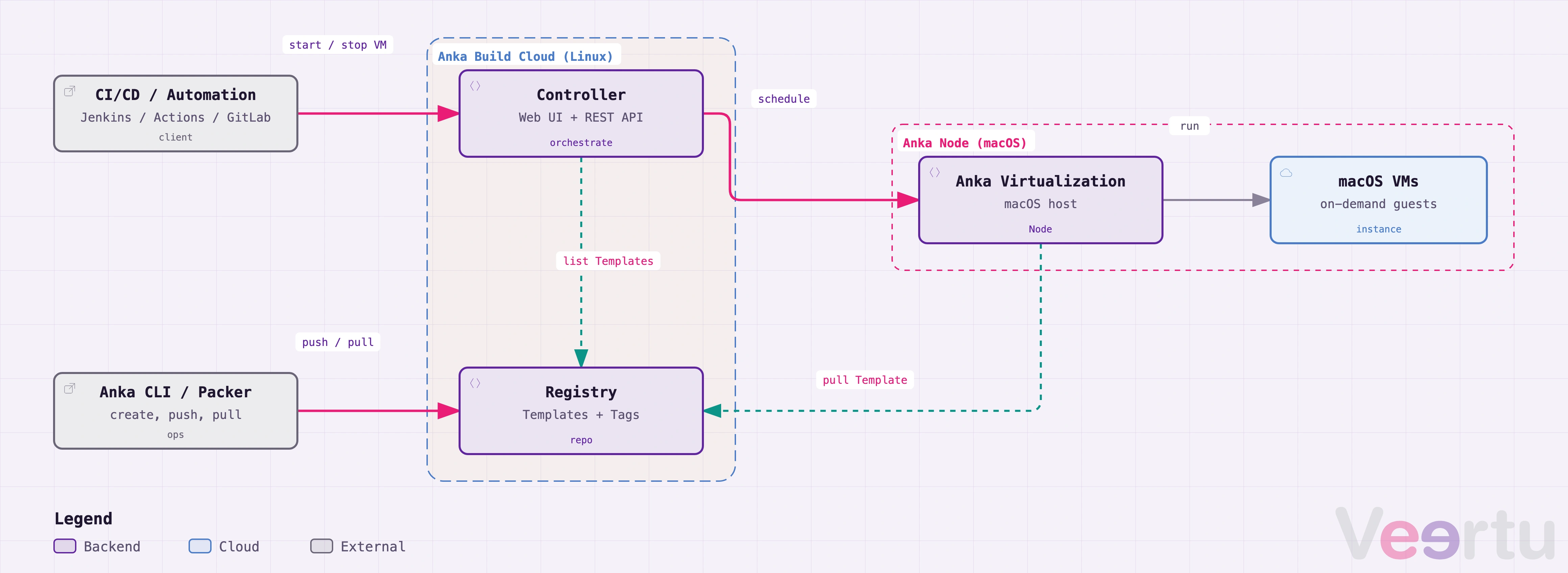
- Easy to install and use; Docker-like experience.
- Built on Apple’s native hypervisor and virtualization, utilizing macOS resource scheduling, power management, and consistency.
- Optimized and configurable VM networking.
- Optimized disk performance and optimizations to minimize host level usage.
- Access to Paravirtualized Graphics (GPU) inside of VMs.
- VM management through the Anka Virtualization CLI, UI app, or web based Build Cloud Controller UI and API.
- Ability to suspend and then instantly start VMs from a specific state. On Apple Silicon, suspended VMs cannot move between hosts (Apple limitation).
- Attach physical USB devices (like an iPhone) to VMs for on-device testing (Intel only).
- Compatible with T2-equipped Intel Macs and Apple Silicon.
- Can be installed on almost all Apple-supported macOS host versions. See MacOS Host Version Support.
- Install and run almost all modern Apple-supported macOS versions inside of VMs. See Supported macOS versions.
DevOps teams implementing Anka can expect flexibility, allowing them to install onto existing infrastructure and automation – whether it’s cloud providers like AWS or on-premises! The Anka Virtualization package can be installed onto macOS hosts that match our host support matrix. The Anka Build Cloud Controller & Registry can run as standalone binaries on macOS, a docker-compose package, and also with our Build Cloud Controller & Registry Helm Chart for Kubernetes users.
You can find several CI/CD plugins or integrations we maintain for our users that abstract the lower level work of pulling and starting VMs for your jobs. Whether it’s on-demand/ephemeral, long-running, and single-use macOS VMs for your developers, iOS, or native app building/testing/CI/CD, Anka will be a good fit for you.
Anka also enables a docker-like experience for teams to create and store project specific VM templates (a.k.a “images”) and tags, including commands to interact with the VM like start, stop, clone, suspend, modify the VM configuration (like cpu or ram), and execution of VM level shell commands.
- Use the Anka Virtualization CLI and Packer to create Anka VM Templates for different versions of macOS, Xcode, etc.
- Store your VM Templates with a specific Tag in the Anka Build Cloud Registry so you can distribute or pull them to different machines and ensure the same starting VM state for every single CI/CD job that runs a VM. You can clone all VMs from a single base VM and they will re-use layers, optimizing disk space on both the Registry and Anka Nodes/hosts.
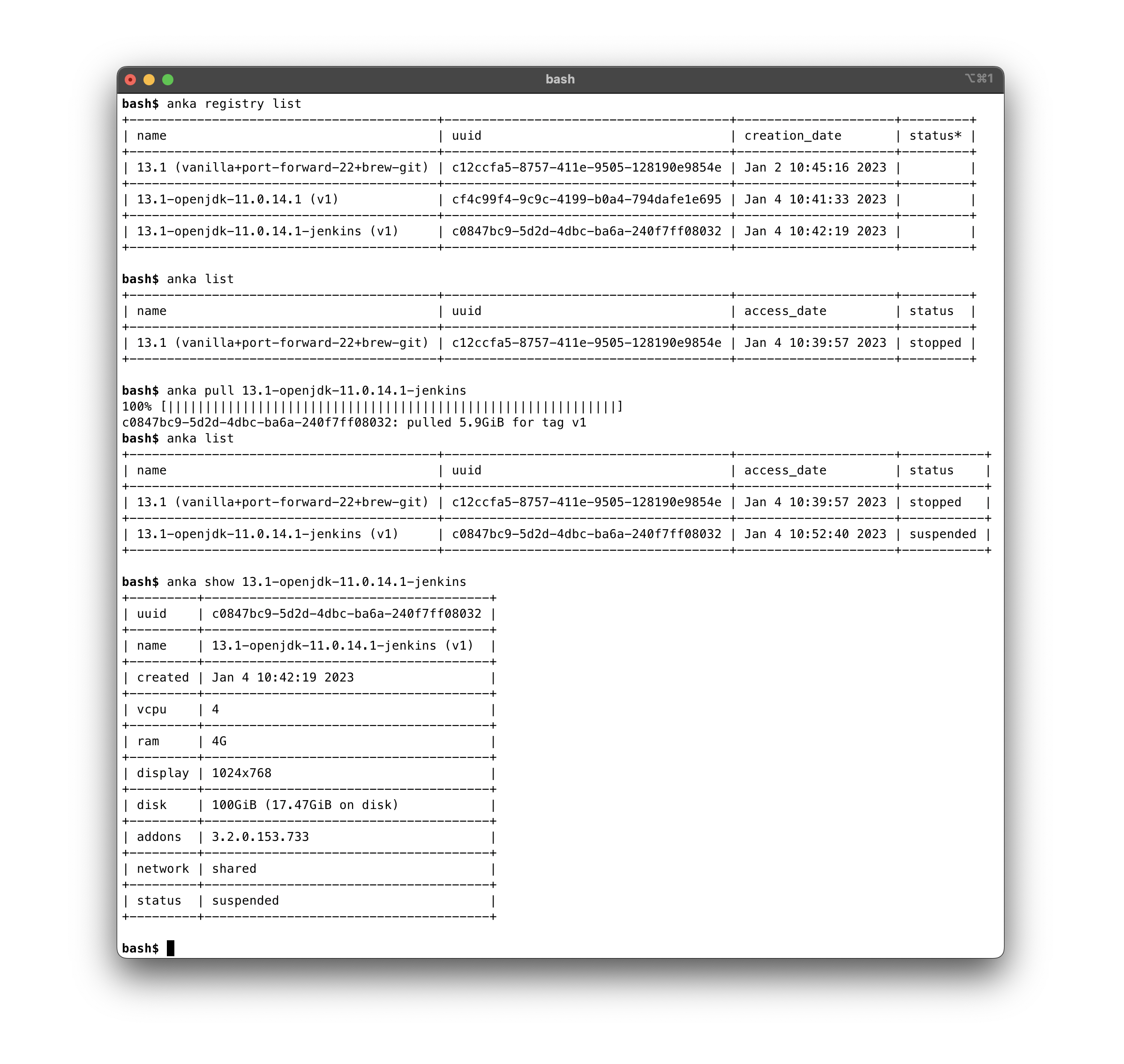
Anka Virtualization CLI
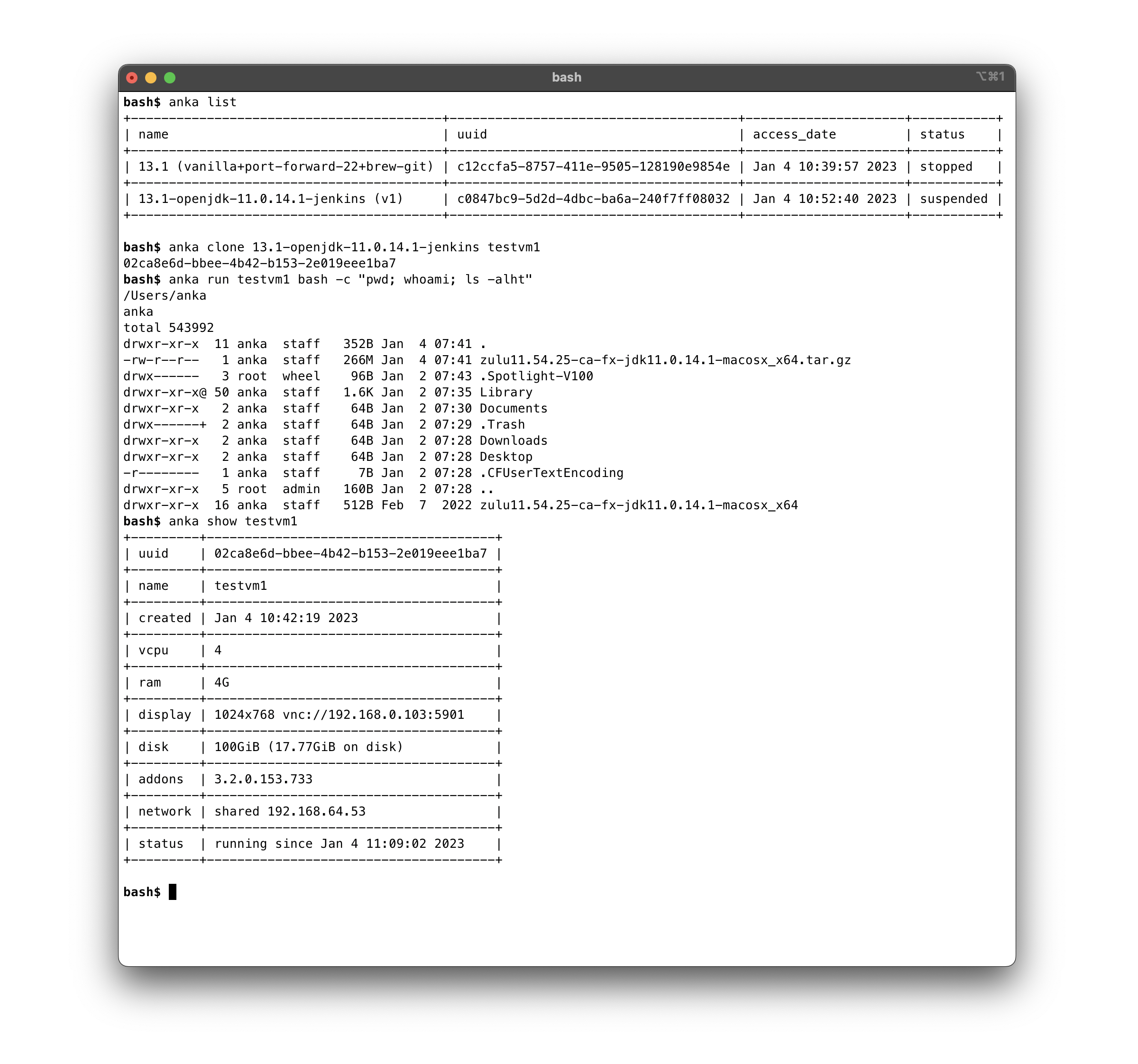
There are many ways in which our customers utilize the Anka Virtualization CLI to automate the VM creation and preparation process:
- Through the
anka createcommand on the host machine:❯ anka create my-ci-vm 26.6.2 - By executing your project installation commands and scripts inside of VMs from the host terminal with
anka runand also directly inside the VM withanka cp&anka run. - Any manual steps you need to perform in the GUI can be done through VNC or automated with Anka Click Scripts.
- Create Packer Templates and run them to perform the steps for VM creation and preparation with our Packer plugin.
Check out the Getting Started installing and using Anka CLI Guide.
- Review the Glossary.
- Install Anka Virtualization Package.
- Create a VM — quick start plus compatibility, clones, export/import, and related topics in the Creating VMs section.
- Access and modify your VM.
- Optional: Build Cloud registry for team-wide template storage.
Anka Build Cloud
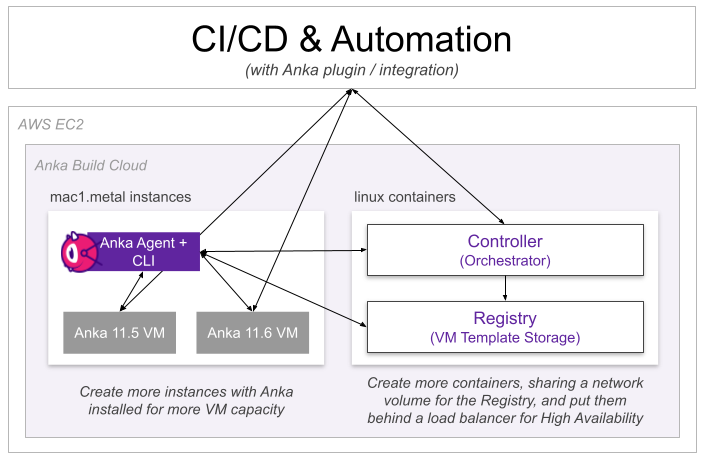
Accompanying the Anka Virtualization package which runs on macOS hardware, we provide the Build Cloud Controller & Registry. Below are two of the most popular examples of how our customers set up Anka Virtualization with the Build Cloud.
Check out the Getting Started setting up and using the Anka Build Cloud guide.
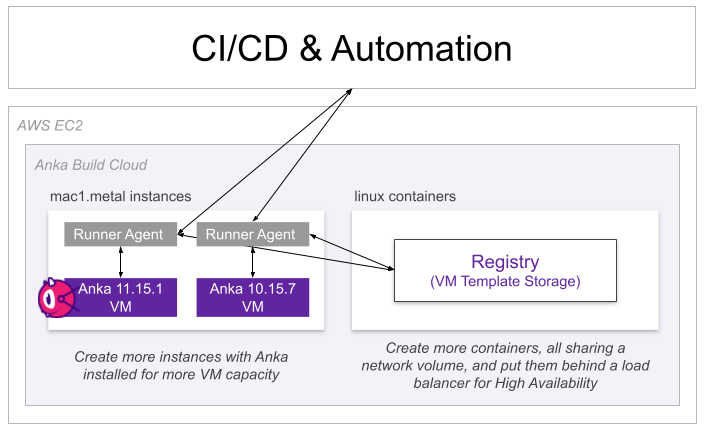
Controller-less (Registry Only)
This setup requires:
- At least one Anka Node (macOS host running the Anka Virtualization software).
- The Anka Build Cloud Registry (Linux container, macOS binaries, or Helm).
- Your CI/CD’s runner/agent installed and able to execute
ankaCLI commands to prepare and use the Anka VM. For example, install the github actions runner and then use our action.
Controller + Registry
This setup requires:
- At least one Anka Node (macOS host running the Anka Virtualization software).
- The Anka Build Cloud Controller & Registry (Linux container, macOS binaries, or Helm).
- Our plugin installed in your CI/CD tool (like the Anka Jenkins Plugin). See a full list of plugins available on our CI Plugins and Integrations page.
Questions? Connect with us
- Email: Email us for any questions
- X: Follow us on X for the latest news
- Slack: Chat with us on Slack
What is Anka?
What Anka is: macOS virtualization and Build Cloud tools for DevOps and CI/CD teams that build and test macOS or iOS apps.
Anka Develop
A limited but free version of our Anka Virtualization software available for developers using laptops
Anka Flow
Anka Flow enables the developers to create and work inside Anka macOS VMs on their local machines
Licensing
Detailed information on Anka Licensing
Glossary
Glossary of Terms
FAQS
Frequently Asked Questions